
Last updated: 28 February 2026 · Written by Axel
You're good at your trade. That's why you're busy. But the busier you get, the more time disappears into admin — chasing quotes, sending invoices at 10pm, wondering if that job last month actually made you any money.
Job management software handles that side of things so you can focus on the work. It's not about changing how you operate — it's about spending less time on paperwork and more time earning.
And if you're just getting started? Even better. The tradesmen who look professional from day one — branded quotes, prompt invoices, a system that doesn't fall apart when they get busy — are the ones who build reputations fastest. At the prices available now (including free tiers), there's no reason not to start strong.
This guide covers what job management software actually does, the features that matter for UK trades, how the main platforms compare, and how to pick the right one — whether you're running a team or working solo out of a van.
What Is Job Management Software?
Job management software is a digital platform that helps tradesmen and field service businesses manage their work from start to finish. That means leads, quotes, scheduling, job tracking, invoicing, expenses, and reporting — all in one place.
Think of it as your business's operating system. Instead of having bits of information scattered across different places — a diary here, a spreadsheet there, messages on your phone — everything lives in one app that you can access from your phone on site or your laptop at home.
The best platforms are designed specifically for trades — they understand that you're quoting from a van, not an office, and that your "team meeting" is a quick chat on site before cracking on with the work.
Who Needs Job Management Software?
Tradesmen just starting out. You've got an advantage most people don't realise — you can set things up properly from the start instead of trying to fix it all later when you're rushed off your feet. A free tier gets you quoting, invoicing, and job tracking from day one. Your customers see a proper operation. You see exactly what you're earning. That's a better position than most tradesmen who've been going ten years.
Sole traders who are getting busy. Once you're juggling five or more active jobs, the mental overhead of remembering who needs quoting, who's been invoiced, and who still hasn't paid starts eating into your time — and your cash flow. A notebook handles three jobs a week. Ten jobs a week with two subbies? That's when things slip through the cracks.
Any tradesman with employees or subcontractors. The moment you're coordinating other people's schedules, you need a shared calendar and job assignment system. Texting job details around works fine with one or two lads — but it gets messy fast as you grow.
Businesses approaching the MTD threshold. From April 2026, sole traders with income over £50,000 must keep digital records and submit quarterly updates to HMRC. If that's you, job management software with MTD-compatible record keeping isn't just nice to have — it's a legal requirement. The threshold drops to £30,000 from April 2027.
Anyone tired of chasing late payments. The average UK tradesman waits 30+ days for payment. Software that sends professional invoices, automated reminders, and accepts card payments on site cuts that dramatically.
The bottom line: if admin is eating into your evenings or you're losing track of who owes you what, software pays for itself almost immediately. And if you're early in your career, starting with the right tools means you never have to dig yourself out later.

Essential Features Checklist
So what should you actually look for? Not all platforms are built equal, and some features matter far more than others for UK trades. Here's what counts — in order of importance:
1. Quoting and Invoicing
This is the core. You need to create professional quotes quickly (ideally from your phone), convert accepted quotes to jobs, then generate invoices when the work's done. Look for:
- Customisable templates with your logo and branding
- Materials and labour line items with markup calculations
- Quote-to-invoice conversion in one click
- PDF generation for emailing to customers
- Online payment links so customers can pay by card immediately
2. Job Scheduling and Calendar
A visual calendar showing all your jobs, who's assigned to what, and when. Drag-and-drop scheduling is standard now. Key features:
- Team scheduling with individual calendars per team member
- Job status tracking (quoted, scheduled, in progress, complete, invoiced)
- Google Calendar sync so personal appointments don't clash
- Route optimisation to plan efficient travel between jobs
3. Customer Management (CRM)
Every customer interaction — quotes, jobs, invoices, notes, photos — stored against their record. When Mrs. Jones calls about the bathroom you fitted two years ago, you can pull up every detail instantly.
4. Expense Tracking and Receipt Capture
Photograph receipts on site, categorise expenses by job, and know your actual profit per job — not just your turnover. This is also critical for MTD compliance, where you need digital records of all business expenses.
5. Accounting Integration
Your job management software needs to talk to your accounting software (Xero, QuickBooks, FreeAgent, or Sage). Two-way sync means invoices and payments flow automatically, and your accountant doesn't have to chase you for records.
6. Mobile App
If the app doesn't work well on your phone, you won't use it. You're on site 90% of the time — the mobile experience needs to be fast, reliable, and usable with dirty hands. Offline mode is a bonus for sites with poor signal.
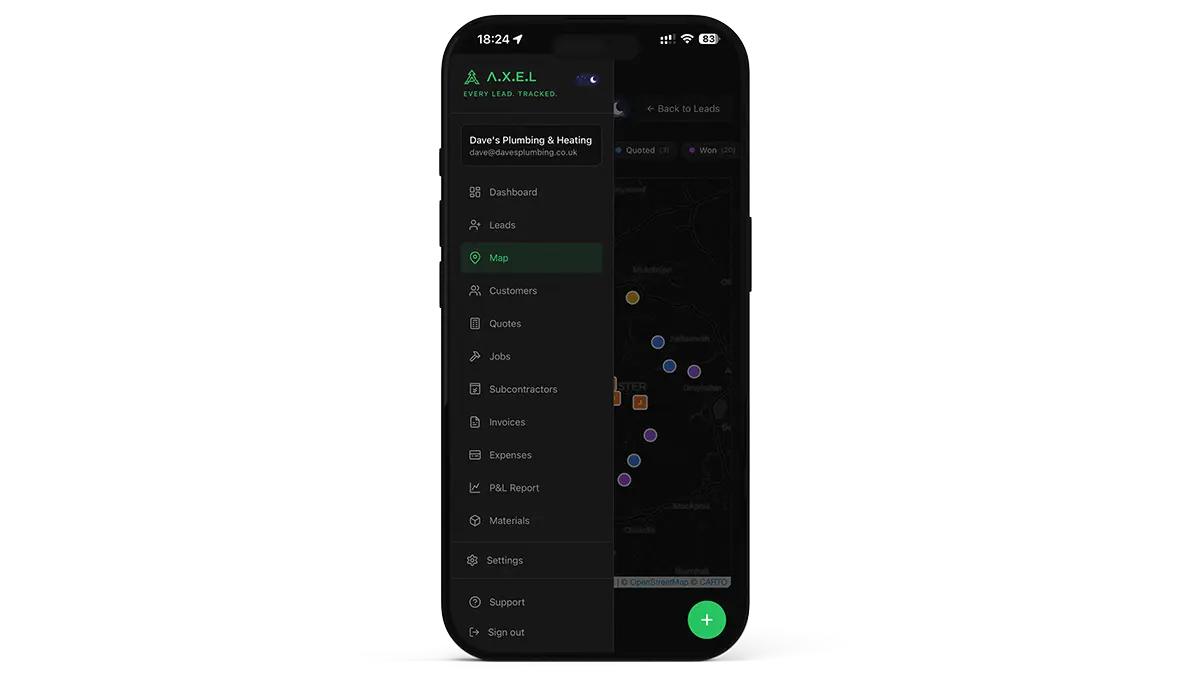
7. Team Management
Timesheets, GPS tracking, job assignments, and the ability to see where your team is and what they're working on. Essential once you have more than two people in the field.
8. Reporting and Dashboards
Revenue by month, outstanding invoices, job profitability, quote conversion rates. You can't improve what you don't measure. Good reporting turns guesswork into decisions.
9. MTD Compliance Features
With Making Tax Digital for Income Tax starting April 2026, your software should either:
- Be MTD-compatible itself (able to submit quarterly updates to HMRC), or
- Integrate seamlessly with MTD-compatible accounting software
This isn't optional for sole traders earning over £50,000. Your software needs to maintain digital records of income and expenses and support quarterly submissions.
10. UK-Specific Features
VAT handling, GBP as default currency, UK date formats, Companies House integration, and support hours that match UK business times. Sounds basic, but many popular platforms are Australian or North American and treat the UK as an afterthought.
How Job Management Software Pricing Works
Now you know what to look for — here's what it'll cost you. There are two main pricing models, and the difference matters.
Monthly Subscription (Per User)
Most platforms charge per user per month. A typical sole trader pays £30–£80/month — less than a single callout charge for most trades. The thing to watch is per-user pricing: add a second user and you're paying double. Add an office admin and that's triple. If you're growing a team, check what the platform costs at three or five users, not just one.
Free Tiers and Trials
Some platforms (including A.X.E.L) offer genuinely free tiers that let you get started without paying anything. Paid tiers then unlock more features as your business grows. Most platforms also offer a 14-day free trial, which is worth trying before committing.
Pricing Overview
| Platform | Monthly Cost | Notes |
|---|---|---|
| A.X.E.L | Free / £19–£119/mo | Free tier, UK-built, GBP billing |
| Jobber | $29–$529/mo USD | USD only, billed annually. Teams: $149–$529/mo (5–15 users) |
| Fergus | £39–£45/mo GBP | GBP billing, + £11/mo per timesheet user |
| ServiceM8 | £0–£269/mo GBP | GBP billing, priced by job count, unlimited users |
| Tradify | £34–£44/user/mo GBP | Per user — doubles with 2 users |
Prices approximate as of February 2026.
Making Tax Digital: Why This Matters Now
From 6 April 2026, Making Tax Digital for Income Tax (MTD ITSA) becomes mandatory for sole traders with gross income over £50,000. From April 2027, the threshold drops to £30,000.
What this means in practice:
- You must keep digital records of all business income and expenses
- You must submit quarterly updates to HMRC using compatible software
- You must submit a final declaration (replacing the Self Assessment tax return) by 31 January
- Paper records and spreadsheets alone will not be compliant
For tradesmen, this is the single biggest change to how you manage your business finances in years. If you're already using job management software that tracks your income and expenses digitally, you're most of the way there. If your current system is a notebook and a stack of receipts — and it's served you well — the reality is that April 2026 is the deadline to add a digital layer on top. You don't have to change how you work day-to-day, but HMRC will need digital records.
The software you choose needs to either submit quarterly updates directly to HMRC, or integrate with accounting software (like Xero or FreeAgent) that does. Check the HMRC list of compatible software before committing.
For a deeper dive on MTD, we'll be publishing a dedicated guide: Making Tax Digital 2026: What Every Tradesman Needs to Know.
Top Job Management Software for UK Trades: Compared
Here's an honest breakdown of the main options available to UK tradesmen in 2026. Every platform has strengths and weaknesses — we've tried to be fair, even where we have an obvious bias.
A.X.E.L
A.X.E.L is our own platform, so take this with appropriate salt. It's built specifically for UK tradesmen with a free tier and affordable paid plans. Features include lead management, quoting, job tracking, invoicing, expense tracking, calendar scheduling, team management, and materials tracking.
Strengths: UK-built, has a genuinely free tier, covers the full job lifecycle from lead to payment. Clean, modern interface. Priced in GBP. Xero and QuickBooks integrations for MTD compliance.
Weaknesses: Newer to market than established competitors. Smaller user community (for now). No native mobile app yet — works via mobile browser.
Best for: UK sole traders and small teams who want a platform built for the UK market with transparent pricing.
Pricing: Free tier available. Paid plans from £19/mo to £119/mo — see pricing page for details.
Jobber
Jobber is a Canadian platform that's popular worldwide, particularly in North America. It's well-established with a polished interface and strong feature set.
Strengths: Mature product, excellent mobile app, strong scheduling features, good online booking and client communication tools. Large knowledge base and support resources.
Weaknesses: Pricing is in USD (no GBP option), North American focus means some UK-specific features are missing. No native MTD support — relies on accounting integrations. Per-user pricing gets expensive with teams. Customer support hours are North American.
Best for: Larger teams who need polished client-facing features and don't mind the USD pricing.
Pricing: $29–$529/month USD, billed annually (no GBP option). Individuals: Core $29/mo, Connect $99/mo, Grow $149/mo. Teams: Connect $149/mo (5 users), Grow $299/mo (10 users), Plus $529/mo (15 users).
Fergus
Fergus is a New Zealand-based platform popular in Australia and growing in the UK. It's particularly strong on job costing and profitability tracking.
Strengths: Excellent job costing and profitability features. Good supplier integrations and purchase order management. Strong GPS tracking and timesheets. Solid quoting with price books.
Weaknesses: Interface can feel cluttered. Support is primarily APAC time zones. Timesheet users cost extra (£11/mo each).
Best for: Tradesmen focused on understanding job profitability and managing materials costs.
Pricing: From £39/mo (Essentials) to £45/mo (Professional) in GBP. Enterprise 10+ is custom pricing. Timesheet users from £11/mo extra.
ServiceM8
ServiceM8 is Australian-built and positions itself as simple, visual job management. It has a genuinely useful free tier and is popular among sole traders.
Strengths: Free tier that's actually usable. Clean, visual interface. Strong communication features (automated SMS, booking reminders, on-the-way notifications). Good electronic forms for certificates and compliance documents.
Weaknesses: iOS only for the mobile app — Android users are out of luck. Australian-centric. Limited team management on lower tiers. Reporting is basic compared to competitors.
Best for: iOS-using sole traders who want a simple, visual system with a free starting point.
Pricing: Free tier (30 jobs/month, 1 user). Paid plans: Starter £25/mo, Growing £59/mo, Premium £119/mo, Premium Plus £269/mo — all in GBP with unlimited users.
Tradify
Tradify is another New Zealand platform that's made inroads in the UK market. It's straightforward and focuses on core trade business needs.
Strengths: Clean, simple interface. Good quoting and invoicing. Google Calendar sync. Reasonable pricing per user. Active in the UK market with UK-relevant content.
Weaknesses: Per-user pricing adds up fast with teams. Some advanced features (custom branding, recurring jobs, inquiry management) locked to higher tiers. No MTD-specific features — relies on Xero/QuickBooks integration. Now owned by The Access Group (UK).
Best for: Small teams wanting a straightforward system without too much complexity.
Pricing: £34/user/mo (Lite), £37/user/mo (Pro), £44/user/mo (Plus) — GBP billing available. Custom plans for large teams (0800 014 8165). Instant Website add-on available.

Full Comparison Table
| Feature | A.X.E.L | Jobber | Fergus | ServiceM8 | Tradify |
|---|---|---|---|---|---|
| Pricing model | Free tier + paid plans | Monthly/user | Monthly/user | Monthly | Monthly/user |
| UK-built | ✅ | ❌ (Canada) | ❌ (NZ) | ❌ (Australia) | ❌ (NZ) |
| GBP pricing | ✅ | ❌ (USD) | ✅ (GBP) | ✅ (GBP) | ✅ (GBP) |
| MTD support | Via Xero/QuickBooks | Via integration | Via integration | Via integration | Via integration |
| Quoting | ✅ | ✅ | ✅ | ✅ | ✅ |
| Invoicing | ✅ | ✅ | ✅ | ✅ | ✅ |
| Job scheduling | ✅ | ✅ | ✅ | ✅ | ✅ |
| Expense tracking | ✅ | ✅ | ✅ | Limited | ✅ |
| Team management | ✅ | ✅ | ✅ | ✅ (paid) | ✅ |
| Materials tracking | ✅ | ✅ | ✅ (Price Books) | ✅ | ✅ |
| Xero integration | ✅ | ✅ | ✅ | ✅ | ✅ |
| Mobile app | Browser-based | ✅ iOS/Android | ✅ iOS/Android | iOS only | ✅ iOS/Android |
| Free tier | ✅ | ❌ | ❌ | ✅ | ❌ |
| GPS tracking | ❌ | ✅ | ✅ | ✅ | ❌ |
| Online bookings | ❌ | ✅ | ❌ | ✅ | ❌ |
| UK support hours | ✅ | ❌ | ❌ | ❌ | ❌ |

How to Choose the Right Software
With so many options, here's a practical framework for deciding:
Step 1: List Your Non-Negotiables
What problems are you actually trying to solve? If it's chasing invoices, prioritise invoicing and payment features. If it's scheduling a team, prioritise calendar and team management. Don't pay for features you won't use.
Step 2: Consider Your Team Size
Sole traders have different needs from a five-person team. Per-user pricing matters less when it's just you, but quickly becomes a significant cost with employees. If you're planning to grow, factor in what you'll pay at five users, not just one.
Step 3: Check MTD Compatibility
This is non-negotiable from April 2026 if you're over the income threshold. Either the software itself needs to be MTD-compatible, or it needs to integrate cleanly with your accounting software. Don't assume — check the HMRC compatibility list.
Step 4: Try Before You Buy
Every platform offers a trial. Use it properly — don't just click around for ten minutes. Create a real quote, schedule a real job, send a real invoice. You'll know within a week whether the software fits how you work.
Step 5: Check What You're Actually Paying
Most platforms are less than a couple of hours' work per month — so the cost isn't the issue. The issue is whether you're paying for features you'll never touch. If you're a sole trader, you probably don't need a plan designed for a ten-person team. Start on the cheapest tier that covers your needs and upgrade when you actually outgrow it.
Step 6: Prioritise UK Suitability
VAT handling, GBP currency, UK date formats, HMRC compliance, and support during UK business hours. These aren't nice-to-haves — they're essentials. A platform designed for Australian plumbers will have blind spots when it comes to UK tax requirements.
Common Mistakes When Choosing Job Management Software
Going off a recommendation without trying it yourself. What works for someone else might not fit how you work. A spark doing commercial contracts has completely different needs from a plumber doing residential callouts. Always try the free trial with your own real jobs before committing.
Paying for features you don't use. You don't need GPS tracking, online bookings, and AI-powered reporting if you're a one-person operation. Start on the tier that covers what you actually need and upgrade when you outgrow it — not before.
Not checking accounting integration. If your job management software doesn't sync with Xero or QuickBooks, you're doing double data entry — which defeats half the purpose.
Forgetting about data export. What happens if you want to switch platforms in two years? Can you export your customer list, job history, and financial records? If the answer is no (or "contact support"), that's a red flag.
The MTD Deadline Is Real — Don't Wait
If your gross self-employment or property income exceeds £50,000, you need to be digitally compliant by 6 April 2026. That's not a suggestion — it's legislation. HMRC have already confirmed the rollout timeline.
Practically, this means you need to:
- Choose MTD-compatible software (or a job management + accounting software combination that's compatible)
- Set up digital record keeping for income and expenses
- Be ready to submit your first quarterly update covering April–July 2026
Leaving this to the last minute means rushing the setup, importing records incorrectly, and potentially missing your first quarterly deadline. Start now.
If you're already using good job management software, you're largely sorted — just confirm the MTD integration works and do a test submission. And if your current system is pen-and-paper? You don't need to throw it out — just layer a digital tool on top so HMRC gets what they need.
Frequently Asked Questions
What's the difference between job management software and accounting software?
Job management software handles the operational side: quotes, scheduling, job tracking, team management. Accounting software handles the financial side: bookkeeping, tax returns, VAT submissions. Most tradesmen need both, connected via an integration. Some job management platforms include basic accounting features, but a dedicated accounting tool (Xero, QuickBooks, FreeAgent) is usually better for tax compliance.
Do I legally need job management software for MTD?
Not specifically job management software — but you do need MTD-compatible software to keep digital records and submit quarterly updates from April 2026 (if your income exceeds £50,000). Job management software that integrates with MTD-compatible accounting software satisfies this requirement while also making your day-to-day operations easier.
Can I use a spreadsheet instead of job management software?
For MTD, spreadsheets alone won't be compliant — you'll need bridging software to submit them to HMRC. For running your business, spreadsheets do the job when you're doing a few jobs a week. But once you're busy, the time you spend updating them is time you're not earning. Most job management platforms have free tiers, so you can try them without spending a penny and see if they actually save you time.
How long does it take to set up job management software?
Most platforms take 1–3 hours to get the basics running: your business details, quote/invoice templates, and accounting integration. Getting fully set up — importing customer lists, setting up team members, customising workflows — usually takes a week of gradual configuration around your normal work.
Is A.X.E.L suitable for larger trade businesses?
A.X.E.L handles team management, job assignment, and multi-user access, so it works for small-to-medium teams. For businesses with 20+ field workers needing advanced features like route optimisation and GPS fleet tracking, you'd want to evaluate whether A.X.E.L's current feature set covers your specific needs. The platform is actively developing, so the feature set is expanding — check the latest at portal.axel.trade.
What happens to my data if I stop paying for subscription software?
This varies by platform. Most give you a grace period to export your data before your account is deactivated. Some lock your data behind a paywall until you resubscribe. Always check the cancellation and data export policies before signing up. Platforms with free tiers (like A.X.E.L) let you keep access to your data even if you downgrade.
Which job management software is best for plumbers specifically?
There's no single answer — it depends on your business size and needs. Sole trader plumbers doing mostly residential work often find ServiceM8's free tier sufficient to start. Growing plumbing businesses with teams benefit from platforms with strong scheduling and team management. UK plumbers specifically should prioritise MTD compliance and GBP invoicing. We've covered trade-specific marketing strategies in our guides on getting more plumbing customers and website vs Checkatrade for plumbers.
---
Photo: @djpplumbingandheatingltd
Job management software isn't glamorous — but it's the difference between spending your evenings on admin and spending them however you want. The right tool gets your quotes out faster, your invoices paid sooner, and gives you a clear picture of what your business is actually earning.
Whether you've been at it for years or you're just getting started, the sooner you take the paperwork off your plate, the more time you've got for the work that actually pays.
If you want to try A.X.E.L — built specifically for UK tradesmen, with a free tier that covers everything you need to get going — sign up at portal.axel.trade.

Is Your Website Winning You Work?
21 practical checks across 5 categories. Score yourself and see where you stand — takes 5 minutes.
Get the Free Checklist →